System package management utility
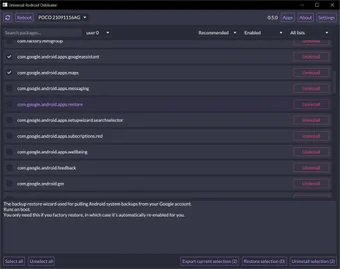
Universal Android Debloater GUI is a free desktop-based tool that interacts with Android devices over ADB to remove, disable, restore, or enable system applications. It provides categorized lists of OEM, carrier, Google, and miscellaneous packages. Each entry is annotated to clarify its function and related dependencies.
Top Recommended Alternative

Universal Android Debloater GUI records all actions in a log for later reference and supports exporting and importing package selections. It recognizes multiple devices and client environments, such as work profiles that are connected simultaneously. System applications are not permanently removed without root access, but the tool can disable them to reduce system-level activity while retaining recoverability.
Debloat control
Universal Android Debloater GUI uses predefined debloat lists sourced from various device ecosystems. These lists are grouped into sets including AOSP, manufacturer layers, social media platform integrations, and carrier additions. Categorization shows packages by vendor/service. Each list entry contains descriptive notes outlining the function of the package, related components, and whether it affects system-level behaviors. Annotations clarify package roles before disabling/uninstalling via ADB.
It supports reversing previous operations through restore and re-enable functions. Every disable or uninstall action is logged automatically to maintain a full historical record of changes made across devices. Log allows review and reapplication of prior operations. Additionally, the export and import feature captures a package selection list into a text-based file format, which can then be reused on other devices. Multi-device recognition allows simultaneous management via ADB.
The software handles multiple profiles, showing your work or secondary apps distinctly to prevent accidental removal. Since system applications cannot be permanently deleted without elevated access, the tool utilizes disablement rather than actual removal for non-rooted setups. If a package essential to system boot is disabled and recovery is triggered, Android’s built-in fallback behavior initiates recovery mode, maintaining system recoverability. However, the interface depends on an accurate ADB connection state.
Focused package control tool
Universal Android Debloater GUI offers categorized system package management disablement, restore, and logging via ADB, without requiring root for operation. The export and import functions allow reuse of configured package sets, and multi-device handling extends functionality across multiple connected phones. While system packages can be disabled to reduce their presence, their full removal requires elevated privileges, and recovery safeguards remain part of the platform’s operation.